Getting Started
asyncio is a Python stdlib eventloop. Most tutorials on using asyncio currently talk
about the async nature of asyncio. How it can be used to work on multiple tasks in parallel.
Pubmarine has a different focus. It assumes that you already have stared to write a program using
asyncio and have discovered that asyncio gives you building blocks but doesn’t implement the higher
level levels needed for an event-driven program. Pubmarine gives you one of those higher levels:
an easy way to pass events from one task to another.
Example: Talk
Before the widespread availability of Google Hangouts, Facebook Messenger, Jabber, and AIM there was a command for two people logged into the same UNIX computer to talk to each other called talk. We’ll create a mini-version of that to illustrate using Pubmarine.
First of all, let’s take a look at what you should be able to do with the end result. Here’s a picture of two terminal windows side-by-side with the talk program running in each one:
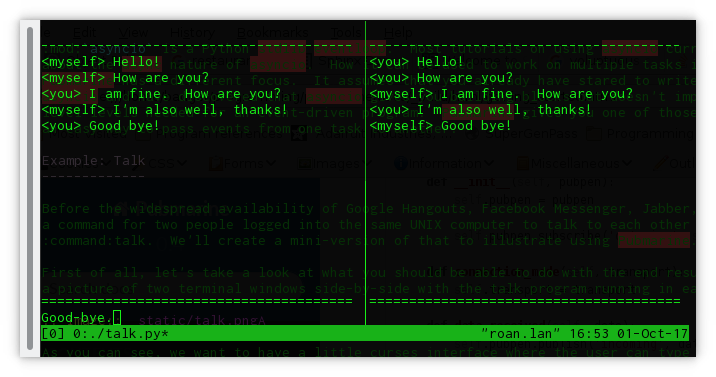
As you can see, we want to have a little curses interface in which each user can type short, one-line messages and have them displayed on the other user’s terminal. Let’s take a look at how we achieve that.
Ye, Olde Imports
The first thing to take a look at in our script is the imports. They’re pretty small for this example program:
import asyncio
import curses
from functools import partial

from pubmarine import PubPen
We have asyncio, of course, so that we can multitask between our IO operations and waiting
for user input. curses handles drawing onto the terminal. functools.partial() is
a handy utility function that we’ll see in action in just a moment. And from pubmarine, we just
need its workhorse, PubPen.
Most of the heavy lifting in this program will be done by asyncio and curses.
pubmarine is a communication channel that will let those two major parts communicate with
each other.
The Network Layer: An Asyncio Protocol
Let’s start with the portion that asyncio will be in charge of: connecting each running
instance of our talk program with all the other ones on the box. In order to handle that, we’ll use
a UNIXsocket. This will write a socket file onto the filesystem and any
program which opens that file will be able to participate in the conversation. We could do this
manually using he socket module from the Python standard library but asyncio provides
us with a helper function that sets up the communication channel to be ready for asynchronous
communications so we’ll use that instead:
PATH = '/var/tmp/talk.sock'

loop = asyncio.get_event_loop()
pubpen = PubPen(loop)
try:
    # try Client first
    connection = loop.create_unix_connection(partial(TalkProtocol, pubpen), PATH)
    loop.run_until_complete(connection)
except ConnectionRefusedError:
    # server
    connection = loop.create_unix_server(partial(TalkProtocol, pubpen), PATH)
    loop.run_until_complete(connection)
In this short piece of code we call asyncio.get_event_loop() to create a vanilla loop that
we’re then going to use for all of our program. You also see your first use of
PubPen here although the only thing we do is initialize it with our
event loop and then use it to initialize the TalkProtocol
class. As we continue to explore the code, we’ll see that we hand this PubPen
to every other class to make use of. Since it’s used to aid communication between parts of the
code, having it available to all of your other objects makes a lot of sense. If you’re not a purist
about global variables, you may want to make a single global PubPen instance
instead of passing it around everywhere.
asyncio.AbstractEventLoop.create_unix_connection() is the workhorse in this piece of code.
It’s a utility function that sets up a client connection via a UNIX socket file. You may notice
that the two blocks inside the try: and the except: are nearly identical. The except:
block just calls asyncio.AbstractEventLoop.create_unix_server() instead. This is because we
want our talk program to act like a peer-to-peer program. Anyone can start the talk program first.
Whoever does so will become the server. The second person to connect will become a client.
(Starting additional programs would start to run into corner-cases with this strategy but solving
those has nothing to do with pubmarine so we’ll leave solving those to some other
demonstration ;-)
Both create_unix_connection() and
create_unix_server() return a asyncio.Future which we have
to run on the main loop. We do that via run_until_complete().
Although we don’t need them here, after the Future completes it returns two
objects to us: a Transport and a asyncio.Protocol. The
Transport encapsulates getting the bytes from the socket into python in a multitasking-friendly
manner. The Protocol encapsulates interpreting those bytes and figuring out what to do with
them later. We have to write our own Protocol because the talk service we are implementing
isn’t a standard with any existing code for it.
The TalkProtocol class
The TalkProtocol isn’t too complicated:
class TalkProtocol(asyncio.Protocol):
    def __init__(self, pubpen):
        self.pubpen = pubpen
        self.pubpen.subscribe('outgoing', self.send_message)

    def send_message(self, message):
        self.transport.write(message.encode('utf-8'))

    def connection_made(self, transport):
        self.transport = transport

    def data_received(self, data):
        self.pubpen.publish('incoming', data.decode('utf-8', errors='replace'), "<you>")

    def error_received(self, exc):
        self.pubpen.publish('error', exc)

    def connection_lost(self, exc):
        self.pubpen.publish('conn_lost', exc)
        self.pubpen.loop.stop()
In the class’s __init__() we see the first real use of the PubPen API.
We use pubmarine.PubPen.subscribe() to have the TalkProtocol watch for outgoing
events. When one occurs, it will call the send_message() callback.
send_message will use the transport layer to send the message out to the other programs
listening on the socket.
subscribe() does not care about where the outgoing event originated.
This allows widely separated parts of your program to talk to each other. They just both need to
have access to the same PubPen instance in order to communicate.
The other methods in the TalkProtocol are all methods that asyncio.Protocol gives us
the option of implementing. Each one is a callback that asyncio sends data to when certain things
happen:
connection_made()is called when a connection is established. Since that sends theTransportto us, we take the opportunity to save it for later use.data_recieved()is called when data arrives on the connection. Here we use anotherPubPenmethod,publish()to publish theincomingevent. You can see that we’re passing two parameters to theincomingevent: a text version of the message and a string representing who is communicating.PubPendoes not have strict checking of arguments when an event is registered. It is up to the publishers and subscribers to make sure that the events and callbacks have matching arguments.[*]_error_received()andconnection_lost()are called when those asyncio transport-level conditions occur. In our code we usepubmarine.PubPen.publish()to alert other code of the events and then, if the connection is lost, we stop the main loop.
Giving Feedback
The talk program uses curses to display an interface in the terminal for the user. All of
the curses code is inside of the Display class.
Initializing the Display
The Display class is defined like this:
class Display:
    def __init__(self, pubpen):
        self.pubpen = pubpen

        self.pubpen.subscribe('incoming', self.show_message)
        self.pubpen.subscribe('typed', self.show_typing)
        self.pubpen.subscribe('error', self.show_error)
        self.pubpen.subscribe('info', self.show_error)
        self.pubpen.subscribe('conn_lost', self.show_error)
As you can see, it consists entirely of subscribing various callbacks inside of the display class to
events that are published elsewhere. (Except for typed, they are all published by the
TalkProtocol. We’ll see where typed comes from shortly.) Pubmarine’s agnosticity
towards where the event was published is good for user interfaces. A user interface has to respond
to events from many sources: generated by the user, from network events, from timers, from hardware
changes, etc. Using pubmarine, the user interface doesn’t have to be strongly connected to those
objects; instead it can receive notification that the objects have changed via the single shared
PubPen object.
If you’ve ever programmed with curses before, you may be wondering where the setup of the
screen and initial layout is. Usually it’s in the __init__ of a class but not this time. In
the example code I make Display into a context manager. That way the screen can be put into raw
mode for curses when the context manager is entered and restored to cooked mode when the context
manager exits:
   def __enter__(self):
        self.stdscr = curses.initscr()

        curses.noecho()
        curses.cbreak()
        self.stdscr.keypad(1)

        max_y, max_x = self.stdscr.getmaxyx()

        self.error_buffer = self.stdscr.derwin(1, max_x, 0, 0)

        [... Set up the rest of the screen widgets here ...]

    def __exit__(self, *args):
        curses.nocbreak()
        self.stdscr.keypad(0)
        curses.echo()
        curses.endwin()

        return False

[...]

if __name__ == '__main__':
    with Display(pubpen) as display:
        [...]
User Interaction
The majority of the methods inside of Display are callbacks. They update the curses
display in response to the events that they are subscribed to. The one callback that is interesting
to us from a Pubmarine standpoint is Display.show_typing(). show_typing() is
called whenever a character is typed. How is that achieved? To find that out, we have to trace
a bit of code from the toplevel all the way back into this method.
At the toplevel, our event loop has two things that it runs over. One of those is the
Transport which asyncio queues to be run by the event loop
inside of its own code. We saw the initialization of those earlier. The other is the routine to
get user input. Let’s look at that now:
task = loop.create_task(display.get_ch())
loop.run_forever()
This code schedules a co-routine from the Display class, Display.get_ch() for
execution by the main loop and then runs the main loop. get_ch() is a short method
defined like this:
async def get_ch(self):
    while True:
        char = chr(await self.pubpen.loop.run_in_executor(None, self.stdscr.getch))
        self.pubpen.publish('typed', char)
This method is an asyncio co-routine which means that this thread of control can be suspended
while it is waiting for I/O to allow other co-routines to be processed. Since both this task and
the Transport task are ultimately waiting on a human typist it
makes sense that each of them can let the program do other things while they are waiting for that
slow input. The method is a short, infinite loop which runs the blocking function,
curses.window.getch() via asyncio.AbstractEventLoop.run_in_executor().
run_in_executor() runs a blocking function in a thread (or
subprocess depending on configuration), allowing other co-routines to process while it waits for the
blocking function to return.
Once the user types a character and the event loop has a chance to execute the
getch() function the method will publish the typed event via
pubmarine.PubPen.publish(). This is the event that Display.show_typing() is subscribed
to:
self.pubpen.subscribe('typed', self.show_typing)
show_typing() itself examines the character being sent to it. If it determines that
hte user hit the [ENTER] key and that the only thing on the line was a . (period) then it
will exit the event loop, causing the program to terminate. Otherwise it will publish the
outgoing event with the line that the user has entered via pubmarine.PubPen.publish(),
update the chat_log window with the user’s text, and then clear the user’s input window:
def show_typing(self, char):
    if char == '\n':
        if self.input_contents == '.':
            self.pubpen.loop.stop()
        self.pubpen.publish('outgoing', self.input_contents)
        self.show_message(self.input_contents, '<myself>')
        self.clear_typing()
        return

    self.input_contents += char

    [... Curses calls to update the input window ...]
What happens to the outgoing event? If you remember when we talked about the
TalkProtocol` class, the method TalkProtocol.send_message() receives that event and
then sends the message over the socket.
Complete Source
The source code for the complete program can be found in the examples directory of the source tree if you want to download and run it or looked at below if you just want to see it in its entirety:
#!/usr/bin/python3 -tt
#
# Copyright: 2017, Toshio Kuratomi
# License: MIT

import asyncio
import curses
from functools import partial

from pubmarine import PubPen


PATH = '/var/tmp/talk.sock'

class Display:
    def __init__(self, pubpen):
        self.pubpen = pubpen

        self.pubpen.subscribe('incoming', self.show_message)
        self.pubpen.subscribe('typed', self.show_typing)
        self.pubpen.subscribe('error', self.show_error)
        self.pubpen.subscribe('info', self.show_error)
        self.pubpen.subscribe('conn_lost', self.show_error)

    def __enter__(self):
        self.stdscr = curses.initscr()

        curses.noecho()
        curses.cbreak()
        self.stdscr.keypad(1)

        max_y, max_x = self.stdscr.getmaxyx()

        self.error_buffer = self.stdscr.derwin(1, max_x, 0, 0)

        self.separator1 = self.stdscr.derwin(1, max_x, 1, 0)
        sep_txt = b'-' * (max_x - 1)
        self.separator1.addstr(0, 0, sep_txt)

        self.chat_log = self.stdscr.derwin(max_y - 3, max_x, 2, 0)
        self.chat_max_y, self.chat_max_x = self.chat_log.getmaxyx()
        self.current_chat_line = 0

        self.separator2 = self.stdscr.derwin(1, max_x, max_y - 2, 0)
        sep_txt = b'=' * (max_x - 1)
        self.separator2.addstr(0, 0, sep_txt)

        self.input_buffer = self.stdscr.derwin(1, max_x, max_y - 1, 0)
        self.input_max_y, self.input_max_x = self.input_buffer.getmaxyx()
        self.input_current_x = 0
        self.input_contents = ''

        self.stdscr.refresh()
        return self

    def __exit__(self, *args):
        curses.nocbreak()
        self.stdscr.keypad(0)
        curses.echo()
        curses.endwin()

        return False

    async def get_ch(self):
        while True:
            char = chr(await self.pubpen.loop.run_in_executor(None, self.stdscr.getch))
            self.pubpen.publish('typed', char)

    def show_message(self, message, user):
        # Instead of scrolling, simply stop the program
        if self.current_chat_line >= self.chat_max_y:
            self.pubpen.loop.stop()
            return

        message = "%s %s" % (user, message)

        # Instead of line breaking, simply truncate the message
        if len(message) > self.chat_max_x:
            message = message[:self.chat_max_x]

        self.chat_log.addstr(self.current_chat_line, 0, message.encode('utf-8'))
        self.current_chat_line += 1
        self.chat_log.refresh()

    def show_typing(self, char):
        if char == '\n':
            if self.input_contents == '.':
                self.pubpen.loop.stop()
            self.pubpen.publish('outgoing', self.input_contents)
            self.show_message(self.input_contents, '<myself>')
            self.clear_typing()
            return

        self.input_current_x += 1
        self.input_contents += char
        self.input_buffer.addstr(0, self.input_current_x - 1, char.encode('utf-8'))
        self.input_buffer.refresh()

    def clear_typing(self):
        self.input_current_x = 0
        self.input_buffer.clear()
        self.input_contents = ''
        self.input_buffer.refresh()

    def show_error(self, exc):
        self.error_buffer.clear()
        self.error_buffer.addstr(0, 0, str(exc).encode('utf-8'))
        self.error_buffer.refresh()


class TalkProtocol(asyncio.Protocol):
    def __init__(self, pubpen):
        self.pubpen = pubpen

        self.pubpen.subscribe('outgoing', self.send_message)

    def send_message(self, message):
        self.transport.write(message.encode('utf-8'))

    def connection_made(self, transport):
        self.transport = transport

    def data_received(self, data):
        self.pubpen.publish('incoming', data.decode('utf-8', errors='replace'), "<you>")

    def error_received(self, exc):
        self.pubpen.publish('error', exc)

    def connection_lost(self, exc):
        self.pubpen.publish('conn_lost', exc)
        self.pubpen.loop.stop()


if __name__ == '__main__':
    loop = asyncio.get_event_loop()
    pubpen = PubPen(loop)

    with Display(pubpen) as display:
        try:
            # try Client first
            connection = loop.create_unix_connection(partial(TalkProtocol, pubpen), PATH)
            loop.run_until_complete(connection)
        except ConnectionRefusedError:
            # server
            connection = loop.create_unix_server(partial(TalkProtocol, pubpen), PATH)
            loop.run_until_complete(connection)

        task = loop.create_task(display.get_ch())
        loop.run_forever()
        task.cancel()
        try:
            loop.run_until_complete(task)
        except:
            pass